In USB 2.0, all communication between the host and a high-speed hub occurs at high speed (480 Mbps). However, low-speed and full-speed devices may still be connected downstream of the hub.
To communicate with these slower devices without blocking the high-speed bus, USB 2.0 uses the Split Transaction Protocol.
Why Split Transactions Are Needed
Without split transactions, a full-speed transaction (12 Mbps) behind a high-speed hub would occupy the high-speed bus for the entire duration of the slow transaction:
| Device Speed | Time to transfer 64 bytes | High-speed bus time wasted |
|---|---|---|
| Full-speed (12 Mbps) | ~43 µs | ~43 µs (could carry ~2,580 HS bytes) |
| Low-speed (1.5 Mbps) | ~341 µs | ~341 µs (could carry ~20,480 HS bytes) |
Split transactions solve this by decoupling the high-speed bus activity from the slow downstream transaction.
How Split Transactions Work
A split transaction divides communication into two separate high-speed transactions with a gap in between:
          High-Speed Bus                Hub TT              LS/FS Device
               │                          │                      │
   ┌───────────┤                          │                      │
   │Start Split│─── HS ──────────────────►│                      │
   │  (SS)     │  Token + optional data   │                      │
   └───────────┤                          │                      │
               │     ◄── ACK ─────────────┤                      │
               │                          │                      │
               │   ★ Bus is FREE here ★  │── FS/LS ────────────►│
               │    (other HS traffic     │  Actual transaction  │
               │     can use the bus)     │  at native speed     │
               │                          │◄─────────────────────│
   ┌───────────┤                          │  Response stored     │
   │Complete   │─── HS ──────────────────►│                      │
   │Split (CS) │  Request result          │                      │
   └───────────┤                          │                      │
               │     ◄── Data/Status ─────┤                      │
               │                          │                      │
The key insight: between Start Split and Complete Split, the high-speed bus is free for other traffic.
Split Transaction Phases
Phase 1: Start Split (SSPLIT)
The host sends a Start Split token at high speed, containing:
| Field | Size | Description |
|---|---|---|
| Hub Address | 7 bits | Address of the high-speed hub |
| SC | 1 bit | Start/Complete flag: 0 = Start Split |
| Port | 7 bits | Downstream hub port number where the LS/FS device is attached |
| S | 1 bit | Speed: 0 = Full-speed, 1 = Low-speed |
| E | 1 bit | Endpoint type encoding (used with ET) |
| ET | 2 bits | Endpoint type: 00 = Control, 01 = Isochronous, 10 = Bulk, 11 = Interrupt |
This is followed by the normal token (IN/OUT/SETUP) and optional data packet, all at high speed.
The Transaction Translator then:
- Identifies the target downstream port
- Buffers the transaction data
- Responds to the host with ACK (accepted the split request)
- Begins the LS/FS transaction on the downstream port at native speed
Phase 2: Complete Split (CSPLIT)
Later (typically in a subsequent microframe), the host sends a Complete Split token to retrieve the result:
| Field | Size | Description |
|---|---|---|
| Hub Address | 7 bits | Same hub as the Start Split |
| SC | 1 bit | Start/Complete flag: 1 = Complete Split |
| Port | 7 bits | Same downstream port |
| S | 1 bit | Speed |
| E | 1 bit | End (for isochronous, marks last microframe) |
| ET | 2 bits | Endpoint type |
The TT responds with:
- The data or status from the completed LS/FS transaction, or
- NYET if the transaction hasn't completed yet
Complete Split Response Codes
| Response | Meaning | Host Action |
|---|---|---|
| DATA0/1 | LS/FS IN data returned successfully | Accept data |
| ACK | LS/FS OUT transaction completed successfully | Transfer done |
| NAK | LS/FS device responded with NAK | Retry the Start Split |
| STALL | LS/FS device endpoint is halted | Report error to software |
| NYET | TT has not yet completed the LS/FS transaction | Retry Complete Split in next microframe |
| ERR | Transaction error on the LS/FS bus | Report error to software |
Example: Bulk IN Split Transaction
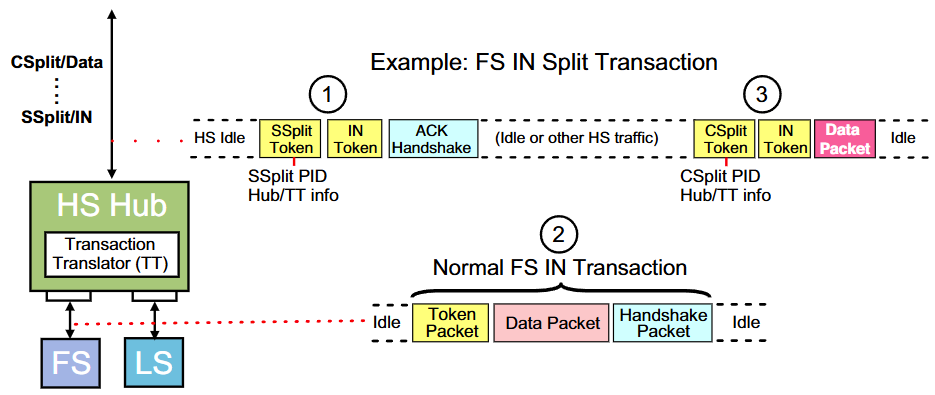
This example shows the packet sequence associated with a Bulk IN split transaction where the downstream hub ports have low- and full-speed devices attached. In this example, a single Transaction Translator sends a packet to the full-speed device.
Sequence
1. Start Split (SS) Transaction
Every split transaction begins with the host sending the Start Split (SS) token packet followed by either:
- An IN token packet, or
- An OUT token followed by a Data packet
All token packets are sent at high speed to the hub.
2. Transaction Translator Operation
The Transaction Translator (TT) within the hub:
- Stores the token packets and data (if an OUT transaction)
- Starts the transaction at the native speed of the attached device (full-speed in this example)
- Stores the Data payload returned from the device
- Awaits the Split Completion transaction from the host
3. Complete Split (CS) Transaction
The host sends the Complete Split (CS) transaction consisting of the same token packets sent in the SS transaction to verify the entry being completed. In this example:
- The data payload is returned to the host via a Data packet
- This completes the Split transaction
Detailed Packet Sequence
Microframe N:
  Host ──── SSPLIT Token ──────────────────► Hub (TT)
  Host ──── IN Token ──────────────────────► Hub (TT)
  Host ◄──── ACK ──────────────────────────── Hub (TT)

       (TT stores tokens and begins FS transaction)
       (TT performs FS IN at native device speed)
       (TT stores returned data payload)
       (HS bus is FREE for other traffic)

Microframe N+1:
  Host ──── CSPLIT Token ──────────────────► Hub (TT)
  Host ──── IN Token ──────────────────────► Hub (TT)
  Host ◄──── DATA0 (64 bytes from device) ── Hub (TT)
  Host ──── ACK ───────────────────────────► Hub (TT)
Example: Interrupt IN Split Transaction
For periodic transfers (interrupt), the timing is tightly scheduled:
| Microframe | Action |
|---|---|
| N | Host sends SSPLIT + IN token; TT ACKs; TT begins LS/FS poll |
| N+1 | Host sends CSPLIT; TT may respond NYET (not done yet) |
| N+2 | Host sends CSPLIT again; TT returns data or NAK |
The host controller schedules Start Splits and Complete Splits in specific microframes based on the endpoint's polling interval. The EHCI controller maintains a periodic schedule for this purpose.
Major Components of a High-Speed Hub
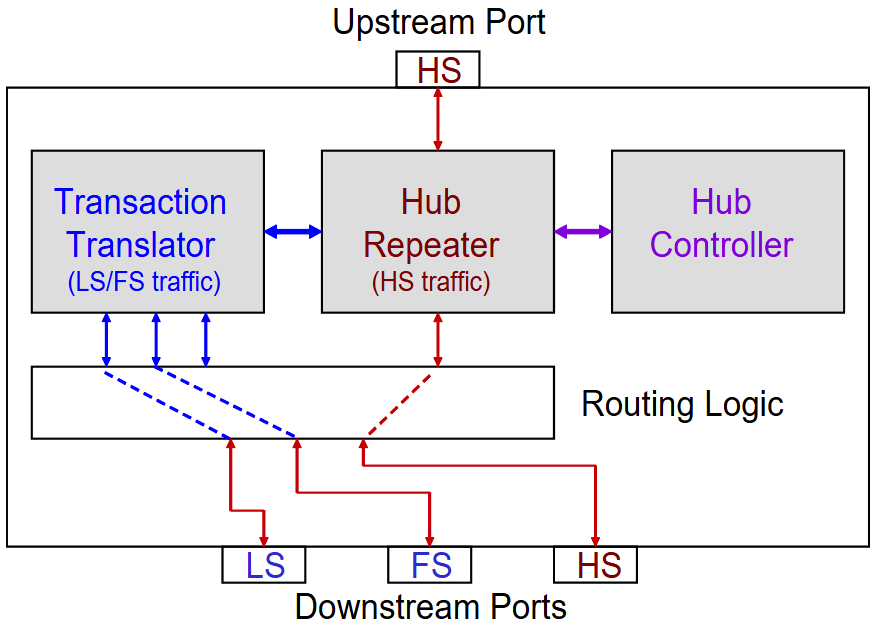
1. Hub Repeater
Handles high-speed upstream/downstream traffic:
- Receives high-speed packets from the host
- Buffers and re-clocks packets
- Forwards packets that are not split transactions
2. Transaction Translator (TT)
The TT is the core component for split transactions — it acts as a miniature LS/FS host controller embedded in the hub:
- Receives Start Split data from the host
- Performs the actual LS/FS transaction at native device speed
- Stores returned data/status in internal buffers
- Returns results during Complete Split
Single-TT vs. Multi-TT Hubs
| Hub Type | TT Count | Behavior |
|---|---|---|
| Single-TT | 1 | All downstream LS/FS traffic serialized through one TT |
| Multi-TT | 1 per port | Each port has a dedicated TT; parallel LS/FS transactions possible |
Multi-TT hubs provide better bandwidth for setups with multiple LS/FS devices but are more expensive. Most USB 2.0 hubs are single-TT.
3. Hub Controller
Manages hub-level operations:
- Processes hub class requests (via EP0)
- Reports port status changes (connect, disconnect, overcurrent)
- Handles port reset and suspend
Benefits of Split Transactions
| Benefit | Details |
|---|---|
| High-speed bus stays free | Slow LS/FS transactions are isolated inside the TT |
| Mixed-speed support | HS, FS, and LS devices coexist on the same hub |
| Improved bandwidth | The HS bus can carry other traffic during the LS/FS transaction gap |
| No LS/FS traffic on HS bus | Raw LS/FS signaling never appears on the high-speed bus segment |
Applicability
| Host ↔ Device Path | Protocol Used |
|---|---|
| Host ↔ HS device (direct) | Normal HS transactions |
| Host ↔ FS/LS device behind HS hub | Split transactions |
| Host ↔ FS/LS device behind FS hub | Normal FS/LS transactions (PRE preamble for LS) |
| Host ↔ HS device behind HS hub | Normal HS transactions (hub acts as repeater) |
Relationship to SuperSpeed
USB 3.0 SuperSpeed does not use split transactions. Instead:
- SuperSpeed hubs maintain a completely separate bus for SS traffic
- Legacy LS/FS/HS devices are handled by the hub's USB 2.0 section
- The two buses operate independently via the dual-bus architecture