Configuration Space Compatibility
- Endpoints and Bridges still have PCI-like headers.
This means that:- Device drivers, BIOS, and OS code written for PCI can still recognize and configure PCIe devices.
- No need to rewrite software just because you switch to PCIe.
📌 Key point:
Even though PCIe uses packets instead of shared parallel buses, the configuration mechanism looks exactly the same to software.
Bridges, Switches, and Root Complex Look “PCI-like”
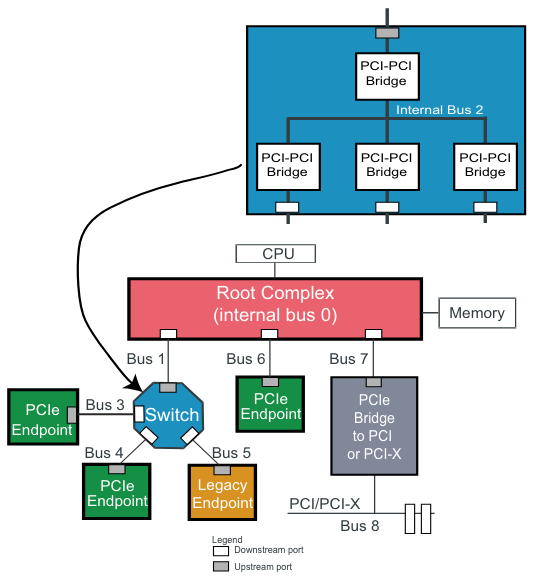
- In PCIe, switches are essentially a collection of virtual PCI-to-PCI bridges.
- The Root Complex also exposes Root Ports that look like bridges.
To legacy software:
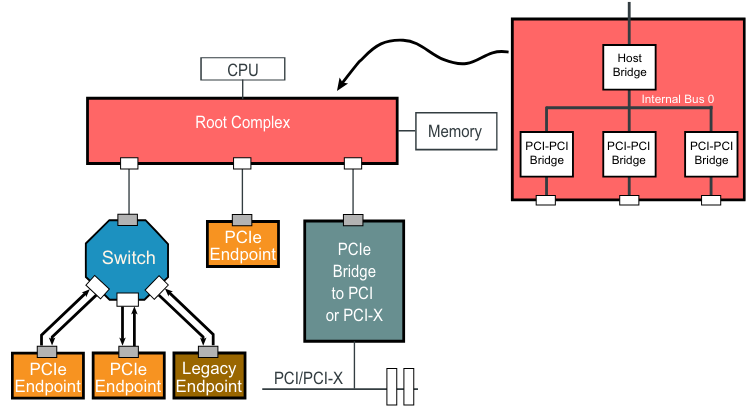
- The Root Complex appears as bus number 0 (just like in PCI).
- Each Root Port appears as a PCI-to-PCI bridge leading to another bus number.
- Each Switch appears as multiple bridges on a shared internal bus.
📌 Key point:
Internally, these may not be “real” PCI buses (they are packet routers), but the software still sees them as if they were traditional PCI buses.
Enumeration Works the Same Way
Enumeration = The process where configuration software:
- Starts from bus 0 (inside the Root Complex).
- Walks each bridge, assigns bus numbers.
- Discovers all devices and allocates system resources (I/O, memory space, interrupts).
Because PCIe preserves the same logical view:
- The enumeration process is unchanged.
- Old BIOS/OS code can discover PCIe devices without modification.